HKEY_CURRENT_USER\Software\Microsoft\Command Processor.
b.) Locate to DWORD value “DefaultColour“.
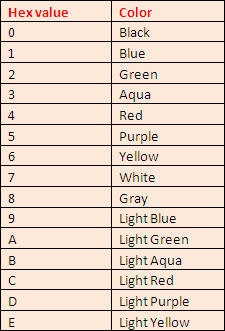
In the right pane, modify the “DefaultColour” value, putting in a hexadecimal number say “E4″. The first digit of this value determines the background colour, and the second digit determines the foreground colour of the text.

In this case, ‘E’ corresponds to Light yellow colour, and ‘4′ corresponds to Red The result in command prompt window with red text on yellow background. Similarly you can set your own choice according to this table:


0 comments:
Post a Comment